> For the complete documentation index, see [llms.txt](https://help.inveterate.com/help-center/llms.txt). Markdown versions of documentation pages are available by appending `.md` to page URLs; this page is available as [Markdown](https://help.inveterate.com/help-center/guides/program-setup/benefits/credit-based-benefits/birthday-credits.md).
# Birthday Credits
**Birthday Credits are a benefit that lets you reward your members with a monetary credit on their birthday — a simple way to surprise and delight your customers.**
**How to Set Up Birthday Credits**
1. Go to the **Benefits** tab in your Inveterate admin.
2. Click on **Birthday Credits**.
3. Enter the **name** of the benefit (this is what the member will see).
4. Add a **description** explaining how the benefit works and why the member is receiving it.
5. Upload an **icon** for the benefit (optional).
6. Set the **credit amount** your members will receive.
7. Click **Save** and **enable** the benefit.
{% hint style="info" %}
In the **Settings** section of your Inveterate admin, you can choose whether Birthday Credits can be **combined with other credits**. Be sure to review and adjust this based on how you’d like the benefit to function.
{% endhint %}
{% hint style="warning" %}
**Note:** For this benefit to appear in the member's portal, make sure Birthday Credits are also **enabled in the Benefits section on your Landing Page**. Without this, members won’t see the prompt to enter their birthday.
{% endhint %}
#### What members see
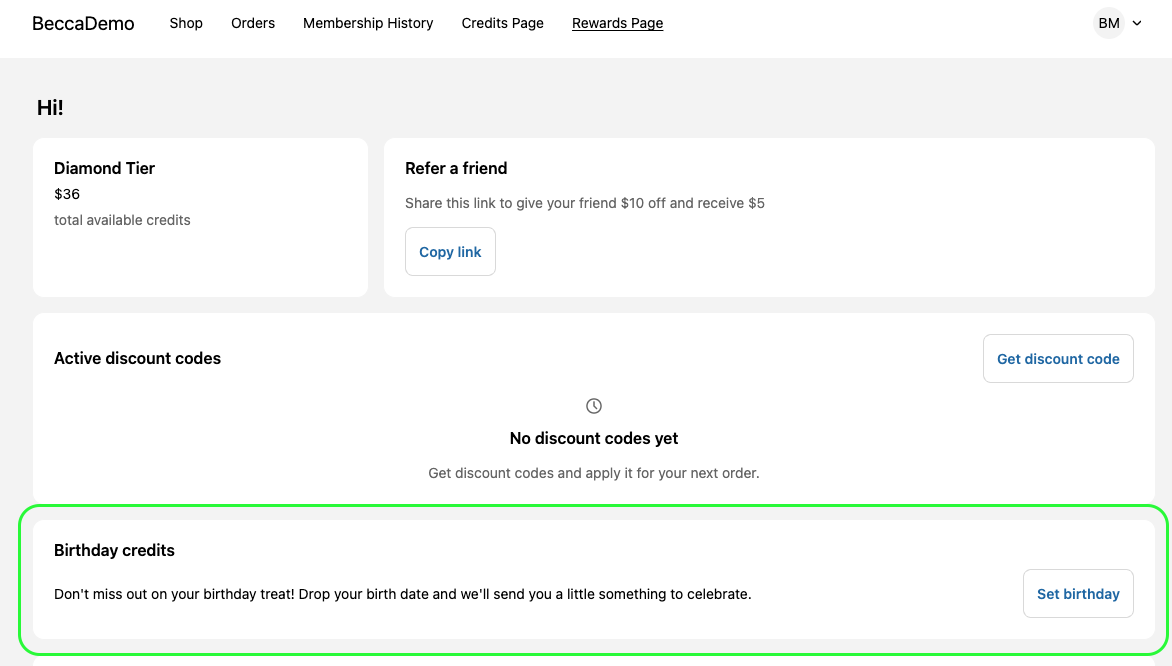
Once enabled, the next time a member logs in to your store and visits their **Rewards Page**, they'll see the **Birthday Credits** section. It will display the following message:
> *"Don't miss out on your birthday treat! Drop your birth date and we'll send you a little something to celebrate."*
Next to this message is a **Set birthday** button. When clicked, the member will be able to select their birthday from dropdown fields.
After submitting their birthday, they’ll be eligible to receive credits on their special day, no further action needed!
#### Manually adding a member's birthday through the Inveterate Admin
Within the Inveterate admin portal - at the individual member level - you are able to manually the birthdate of a member. This can be done by clicking the pencil icon next to the "Birthdate" field in their profile as seen below:
#### Download the PDF below for step-by-step instructions
{% file src="/files/7EJreOQLkMYIquSO2erC" %}